What Technology and Devices Are Needed for Full‑Time Online Schooling?
byConnections Academy
5 min to read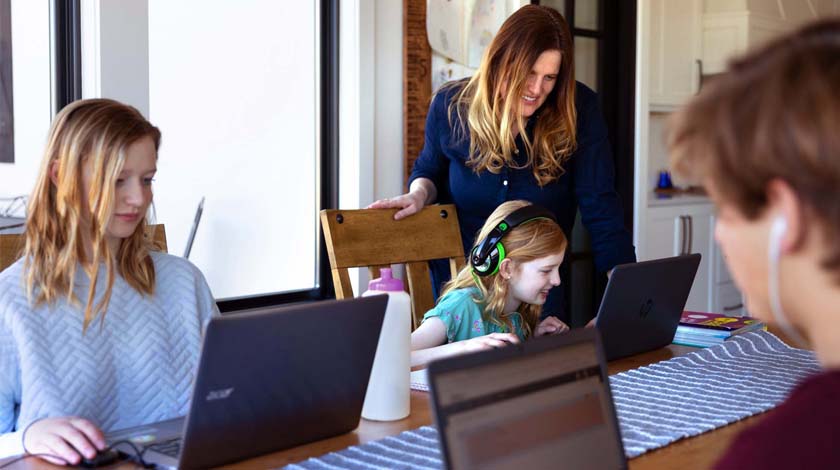
Full‑time online schooling gives students the flexibility to learn from home, but families often ask an important first question: what do you need for online school? The good news is you don’t need anything fancy. In most cases, online schools don’t require specialized or expensive equipment.
With a reliable computer, steady internet access, and a few basic tools, students can fully participate in lessons, complete assignments, and connect with teachers throughout the school day. And if something goes wrong, support is usually available, so you’re not figuring it out alone.
Here’s what families typically need for full‑time online schooling.
Computer and Device Requirements
To help your student show up for lessons, complete assignments, and stay connected with teachers throughout the school day, having the right technology in place matters. For full‑time online schooling, a desktop or laptop works best because it supports the tools students use for live lessons, coursework, and daily communication.
Tablets and smartphones can be helpful for quick tasks, but they may not support everything your student needs for consistent, full‑day learning.
Most online schools recommend:
A PC or Mac laptop, or desktop computer.
A device capable of running modern web browsers.
A physical keyboard and mouse, or trackpad.
These basics help your student access learning platforms, participate in lessons, and complete coursework without unnecessary frustration. Families considering Connections Academy can review detailed, school‑specific technology requirements for the school available in their area on our website.
Internet Speed and Connectivity
A reliable internet connection is essential for full‑time online schooling. Students use the internet throughout the day to access lessons, join live sessions, submit assignments, and communicate with teachers.
Internet needs can vary depending on:
The number of students learning at home
How many devices are connected at the same time
Whether students attend live lessons simultaneously
A stable connection is often more important than having the fastest available speed. Families with multiple students may benefit from higher bandwidth to support video conferencing and streaming without interruptions.
Once the right device is in place, the next piece is the software your student uses each day to access lessons, stay organized, and connect with teachers.
Software and Browsers You'll Need
For Connections Academy, all of this comes together in Pearson Online Classroom, where students can join live lessons, see assignments, message teachers, and keep track of their progress - all in one place.
What’s needed to access:
An up‑to‑date web browser
Access to productivity tools for writing and assignments
Video conferencing capabilities for live lessons
In many cases, the required software is web‑based or provided by the school, reducing the need for families to purchase additional programs.
Webcams, Headphones, and Other Helpful Accessories
While not always required, certain accessories can improve the online learning experience:
A webcam for live classes and check-ins.
A microphone or headset for clear audio.
Headphones to reduce distractions, especially in shared spaces.
Most modern computers include built-in webcams and microphones, but external accessories can help students stay focused and engaged during lessons.
Does Your Online School Provide Equipment?
Technology policies vary by school. Some Connections Academy‑supported schools provide computers at no cost, while other schools require or allow students to use their own devices.
If families use their own computer, they are responsible for maintenance and upkeep of the hardware. Because policies differ by location, families are encouraged to review their specific school technology guidelines before enrollment. If you’re not sure where to find them, your school can point you in the right direction.
What to Do If You Run into Tech Issues
Technical issues can happen in any learning environment. Full‑time online schools typically offer support to help families troubleshoot problems quickly. And that can make a big difference on a busy school day.
Connections Academy provides access to a dedicated technology support team to assist families with platform access, device compatibility questions, and other technical concerns. This support helps minimize disruptions and keeps students learning with confidence.
Having the right technology in place helps students focus on learning—not troubleshooting. With a reliable computer, consistent internet access, and support from the school, families can feel prepared to navigate full‑time online schooling.
Find the Right Learning Fit for Your Family
With the right tools and the right support, online school can be manageable and enjoyable for the whole family. And just as importantly, you’re not doing this alone. Teachers and support teams are there to help students stay on track and keep moving forward with confidence.
If you’re exploring whether online school could be the right fit for your child, learn how Connections Academy supports students at every grade level.
FAQs About Online School Technology
How fast does our internet need to be for online school?
Internet speed needs vary based on household size and device use, but a stable connection that supports video conferencing and streaming is important for daily learning.
Do online public schools provide free computers?
Some online public schools, including certain Connections Academy‑supported schools, provide computers at no cost, while others require students to use their own devices.
What happens if our technology stops working during the school day?
Online schools typically offer technical support to help families resolve issues and minimize learning disruptions. Connections Academy offers dedicated tech support for enrolled families.
Does my child need a printer for online school?
Most assignments are completed and submitted digitally, but having occasional access to a printer or scanner can be helpful for some activities.
Can online school technology be hard for younger students to use?
Online school technology is designed to be simple and age appropriate. With clear navigation and parent support, younger students can use the tools comfortably as part of their daily routine.
Related Posts




Ready to Learn More About Connections Academy?
Explore the benefits of attending Connections Academy, a tuition-free, accredited online public school that’s passionate about helping your child thrive.